Home > Blog > Components of a DIY Home Security System: What Do You Need?
Components of a DIY Home Security System: What Do You Need?
By INSEETECH December 9th, 2024
Components of a DIY Home Security System: What Do You Need?

Components of a DIY Home Security System: What Do You Need?

In today's world, home security is no longer a luxury—it’s a necessity. For those who prefer flexibility and cost-effectiveness, DIY home security systems are a game-changer. Whether you live in an apartment or a spacious house, building your own system allows you to tailor it to your specific needs. But where do you start? Let’s break down the essential components of a DIY home security system and how to choose the right configuration for your home.


1. The Brain of the System: The Control Hub

The control hub, or main panel, acts as the nerve center of your security system. It connects and manages all other components, often through WiFi, Z-Wave, or Zigbee.

Key Features to Look For:

  • Wireless connectivity: Ensures smooth communication between components.
  • Remote control: Allows you to monitor and manage the system through a mobile app.
  • Integration options: Some hubs integrate with smart home devices like lights, locks, and thermostats.

Pro Tip:

Choose a control hub that is user-friendly and expandable, so you can add more devices as needed.


2. Eyes on Your Property: Security Cameras

Cameras are your first line of defense. They monitor activity around your home and can deter potential intruders.

Types of Cameras:

  • Indoor cameras: Perfect for monitoring entryways or high-traffic areas.
  • Outdoor cameras: Designed to withstand weather conditions while keeping an eye on your yard or driveway.
  • Doorbell cameras: Provide a clear view of visitors at your front door.

Key Features to Consider:

  • Resolution: Go for at least 1080p for clear footage.
  • Night vision: Essential for round-the-clock surveillance.
  • Motion detection: Alerts you to unexpected activity.

Pro Tip:

Opt for cameras with cloud storage or local SD card options for secure video recording.

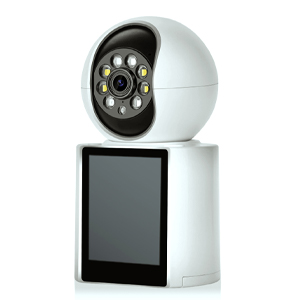
Boost home security with our 5MP Dual Lens WiFi Cam. 2.4GHz Smart Pet Security, wireless nanny cam, auto-recorded door camera, continuous video, 2-way sound—your all-in-one solution for peace of mind.
SHOP NOW >>

3. Protecting Entry Points: Door and Window Sensors

Door and window sensors are small but mighty components. They alert you whenever an entry point is opened without authorization.

How They Work:

These sensors typically consist of two parts: one attached to the door or window and the other to the frame. When the magnetic connection between them breaks, the sensor triggers an alert.

Choosing the Right Sensors:

  • Wireless options: Easier to install and relocate if needed.
  • Battery life: Look for sensors with long-lasting batteries to reduce maintenance.

Pro Tip:

Install sensors on all ground-floor entry points for maximum coverage.


4. Loud and Clear: Alarms and Sirens

An alarm or siren is a critical deterrent in your security system. When triggered, it emits a loud noise to scare off intruders and alert nearby individuals.

What to Look For:

  • Decibel level: A siren should be loud enough to be heard both inside and outside the home.
  • Customizable alerts: Some systems allow you to choose between sirens, voice alerts, or silent alarms.

Pro Tip:

Place your alarm near the main entry point to maximize its impact.


5. Extra Layers of Security: Motion Detectors

Motion detectors add another layer of protection by monitoring movement within your home. They’re ideal for large areas such as living rooms or hallways.

Features to Consider:

  • Pet immunity: Avoid false alarms from pets with motion detectors designed to ignore animals under a certain weight.
  • Range and sensitivity: Ensure the detector covers the necessary area without being overly sensitive.

6. Backup Power: Battery and Cellular Options

A reliable security system should remain operational during power outages.

Backup Options:

  • Battery-powered devices: Ensure continuous operation even if electricity is down.
  • Cellular backup: Keeps your system connected in case of internet disruption.

Pro Tip:

Look for systems with low-battery notifications to stay ahead of maintenance needs.


How to Choose the Right Configuration for Your Home

Assess Your Needs:

  • Small apartment: A basic setup with a control hub, one or two cameras, and door sensors should suffice.
  • Large home: Invest in multiple cameras, motion detectors, and window sensors for comprehensive coverage.

Set a Budget:

DIY systems can range from budget-friendly options to premium configurations. Decide which features are essential and which you can add later.

Consider Smart Home Integration:

For added convenience, integrate your security system with existing smart devices for automation and voice control.

Building a DIY home security system might seem daunting at first, but with the right components, it’s easier than you think. Start with a control hub, add cameras for surveillance, and secure entry points with sensors. From there, you can expand your system with alarms, motion detectors, and other advanced features.

Bluetooth Vehicle Backup Cameras: How to Choose the Right One for You
Previous
Bluetooth Vehicle Backup Cameras: How to Choose the Right One for You
Read More
Redefine Home Security: The AOV Dual-Lens Solar Camera - Your 24/7, Self-Powered Guardian
Next
Redefine Home Security: The AOV Dual-Lens Solar Camera - Your 24/7, Self-Powered Guardian
Read More