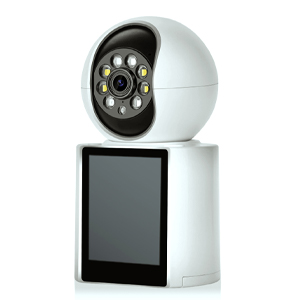
With the rapid advancement of surveillance technology, hidden cameras have become smaller, cheaper, and more discreet than ever. They can be found in places you’d never expect—hotels, Airbnb rentals, public restrooms, even office meeting rooms. This guide will teach you how to detect hidden cameras, what they look like, how to check for them effectively, and what to do if you find one.
Hidden cameras are designed to blend into their surroundings. They can be disguised as:
Smoke detectors
Wall clocks or alarm clocks
USB chargers or power banks
Picture frames or light bulbs
Coat hooks, air purifiers, or mirrors
Most of them have a tiny lens, often the size of a pinhole. These lenses can reflect light and are usually positioned to face toward beds, bathrooms, or private areas. Some may also have a faint red glow from infrared night vision LEDs, visible only in dark environments.
Look for objects that seem oddly placed or duplicated (e.g., two smoke detectors).
Check for small holes, black dots, or reflective surfaces facing private spaces.
Use your phone’s flashlight in a dark room to scan suspect areas—camera lenses may reflect the light differently.
IR Light Test: In a dark room, use your front-facing camera to scan the area. Some infrared lights are visible through phone cameras even if invisible to the naked eye.
Hidden Camera Apps: Apps like "Hidden Camera Detector" or "Glint Finder" can help detect unusual lenses or magnetic fields.
Use apps like Fing to scan the local WiFi network.
Look for unfamiliar devices named “IP Camera,” “Unknown Device,” or suspicious brand codes.
Disconnect your own devices temporarily to see what remains connected.
For those who travel frequently, a radio frequency (RF) detector can help identify wireless transmissions from hidden devices. Slowly sweep the room, especially near electronics, air vents, or furniture.
Document It: Take clear photos and videos showing the device and its location.
Cover or Disconnect: Unplug or cover the lens with tape if it's a standalone unit.
Report Immediately: Notify property management, Airbnb customer service, or hotel staff. If necessary, contact local law enforcement.
Change Accommodation: If the situation feels unsafe, relocate and request a refund or alternative booking.
Do not damage or destroy the device—it may become evidence.
Do not confront hosts or staff aggressively. Handle it through formal channels.
Pack a small hidden camera detector: Inexpensive tools are widely available online.
Use lens covers or stickers: Temporarily block cameras in suspicious spots.
Stick to reputable platforms: Choose hosts or hotels with numerous positive reviews.
Physically inspect common hiding places: clocks, smoke detectors, plugs, and air vents.
The idea of being watched without consent is unsettling, but with a few simple tools and a bit of awareness, you can protect your privacy. Whether you're traveling, working in a shared space, or staying in a vacation rental, learning to detect hidden cameras is an essential skill in today’s connected world.
Stay vigilant. Stay informed. Your privacy matters.
Copyright © 2023 INSEETECH LIMITED. All Rights Reserved.