In today’s world, ensuring the safety of your home is more important than ever. One of the most effective ways to enhance your home's security is by installing a security camera system. However, with the wide variety of options available on the market, choosing the right security camera can be a daunting task. This article will guide you through the most critical features to consider when selecting a security camera for your home.
The resolution of a security camera is a crucial factor that directly impacts the clarity of the recorded footage. Most modern security cameras offer resolutions ranging from 720p to 4K. A higher resolution provides more detailed images, which is essential for identifying faces, license plates, or other critical details. For general home use, an indoor or outdoor camera with at least 1080p (full HD) resolution is recommended. This ensures a good balance between image quality and storage space, as higher-resolution footage requires more storage capacity.
Security threats don’t only occur during the day, making night vision an indispensable feature for home security cameras. Night vision is achieved through infrared (IR) technology, which allows the camera to capture images in low light or complete darkness. When choosing a camera, pay attention to the range of its night vision, typically measured in meters or feet. A camera with a night vision range of 20 to 30 meters is usually sufficient for most residential properties. Additionally, some cameras are equipped with color night vision, which provides clearer and more detailed footage than traditional black-and-white infrared images.
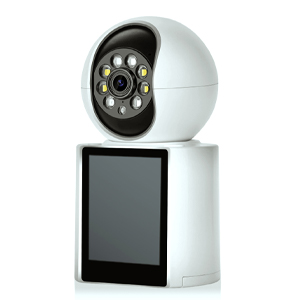
For those seeking advanced night vision, consider a camera that offers multiple night vision modes. For example, the INSEETECH 4MP Tuya Smart Camera comes equipped with 10 array LEDs enabling HD imaging up to 66ft/20m with smart, infrared, and full-color night vision modes, which allows them to capture clear images even in complete darkness. Additionally, some models feature built-in LED lights that can function as outdoor lighting, enhancing security while illuminating your garden or driveway.
Motion detection is a feature that triggers the camera to start recording or send an alert when it detects movement in its field of view. This is particularly useful for reducing the amount of footage stored and for promptly notifying homeowners of potential intrusions. Advanced motion detection systems can differentiate between human movement and other types of motion, such as pets or passing vehicles, reducing the likelihood of false alarms. Some cameras also offer customizable motion detection zones, allowing users to focus on specific areas where activity is most likely to occur.
A good example of this technology in action is the INSEETECH 4MP smart indoor security camera equipped with AI-based motion tracking. The camera can intelligently detect and follow moving objects, providing real-time alerts to your smartphone or other devices. Some models also offer the ability to filter out non-human motion, ensuring that your alerts are focused on what truly matters. This type of functionality is particularly useful in indoor settings like living rooms or bedrooms, where monitoring human activity is essential.
The way a security camera stores footage is another essential consideration. There are two primary types of storage: local and cloud-based. Local storage typically involves recording footage to a microSD card or a digital video recorder (DVR), while cloud storage uploads the footage to a remote server. Each option has its advantages. Local storage is generally more secure from hacking but can be vulnerable to theft or damage. Cloud storage, on the other hand, provides easy access to footage from anywhere with an internet connection but may require a subscription fee and raises potential privacy concerns. Many modern cameras offer hybrid storage solutions, combining the benefits of both local and cloud storage.
Finally, consider the camera’s connectivity and how well it integrates with other smart home devices. Most security cameras connect to the home network via Wi-Fi, but some models offer Ethernet connections for a more stable and secure connection. Additionally, many cameras are compatible with smart home ecosystems such as Amazon Alexa, Google Assistant, or Apple HomeKit, allowing users to control the camera with voice commands or integrate it into broader home automation setups. Cameras that support two-way audio also allow homeowners to communicate with visitors or potential intruders remotely.
Choosing the right security camera for your home requires careful consideration of several key features. By focusing on resolution, night vision, motion detection, storage options, and connectivity, you can select a camera that meets your specific needs and provides peace of mind. While the market offers a vast array of options, understanding these critical features will help you make an informed decision and enhance the security of your home.
Copyright © 2023 INSEETECH LIMITED. All Rights Reserved.